

Share dashboards
Share one dashboard at a time, without sharing its project. Sharing a dashboard shares its numbers: charts run with the rights of the person who made each chart, not the person viewing it.
Who can see a dashboard
Section titled “Who can see a dashboard”| Access | What it gives |
|---|---|
| View Project or Modify Project | Every dashboard of that project |
| A dashboard share | That dashboard, through your own account, role, team or division |
| A dashboard viewer account | Only dashboards explicitly granted by a superadmin |
| A public link | That dashboard without signing in, while the link works |
| An embedded dashboard | That dashboard inside another app, while its embed access works |
Viewers choose their own filter values. A dashboard does not apply a separate row-access rule for each person: with the same filters, people see the same numbers, subject to personal and sensitive data restrictions.
Make separate dashboards with chart filters for different audiences. A public link can also lock filter values; an ordinary share cannot lock a viewer’s non-personal filters.
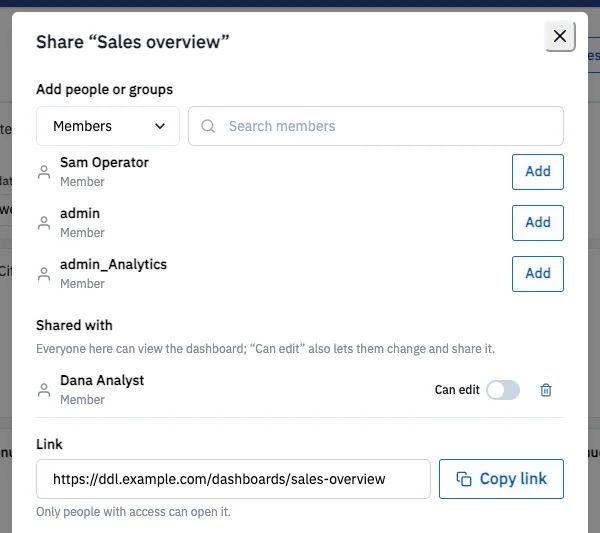
Share with people in DDL
Section titled “Share with people in DDL”- Open the dashboard and click Share. You need edit access to the dashboard.
- Under Add people or groups, use Share with to choose Members, Roles, Teams or Divisions, then search.
- Click Add next to a name. It moves to Shared with, marked as new.
- Switch on Can edit for people who may change and share the dashboard. Everyone listed can view it.
- Click Save. DDL confirms Sharing updated.
To remove access, click the bin next to the name, then Save. Undo restores it before you save. Switching Can edit off keeps view access.
- Standard accounts can share with their own division only; superadmins can choose any division.
- Free accounts can receive view access, not Can edit.
- You cannot pick dashboard viewer accounts here. A superadmin gives them access in Dashboard access.
- Save at most 100 sharing changes at once.
- Recipients find the dashboard in Shared with me. Members added individually may receive an e-mail if your DDL sends sharing notifications.
Send the link
Section titled “Send the link”Use Link › Copy link. Only people who already have access can open it; copying does not grant access. The address also carries your current filter values, so recipients can start with the same view.
Personal and sensitive data
Section titled “Personal and sensitive data”People with project access and superadmins can see real personal values. For other viewers, columns your administrator marked as personal data show •••, with Personal data hidden, while masking is enabled. This includes dashboard-only share recipients, viewer accounts, public visitors and embedded visitors, and applies to CSV and PNG exports too. Counts, sums and averages stay visible.
Filters on personal-data columns stay locked at their defaults for people without project access.
For data marked Sensitive data (AI), people without project access see grouped numbers only, never source rows. Row charts and their CSV export are refused. A dashboard showing sensitive data cannot have a public link or be embedded.
Public links
Section titled “Public links”A public link lets anyone who has it view the dashboard without a DDL account. People cannot open the project or its source data. Treat the link as access to the displayed numbers.
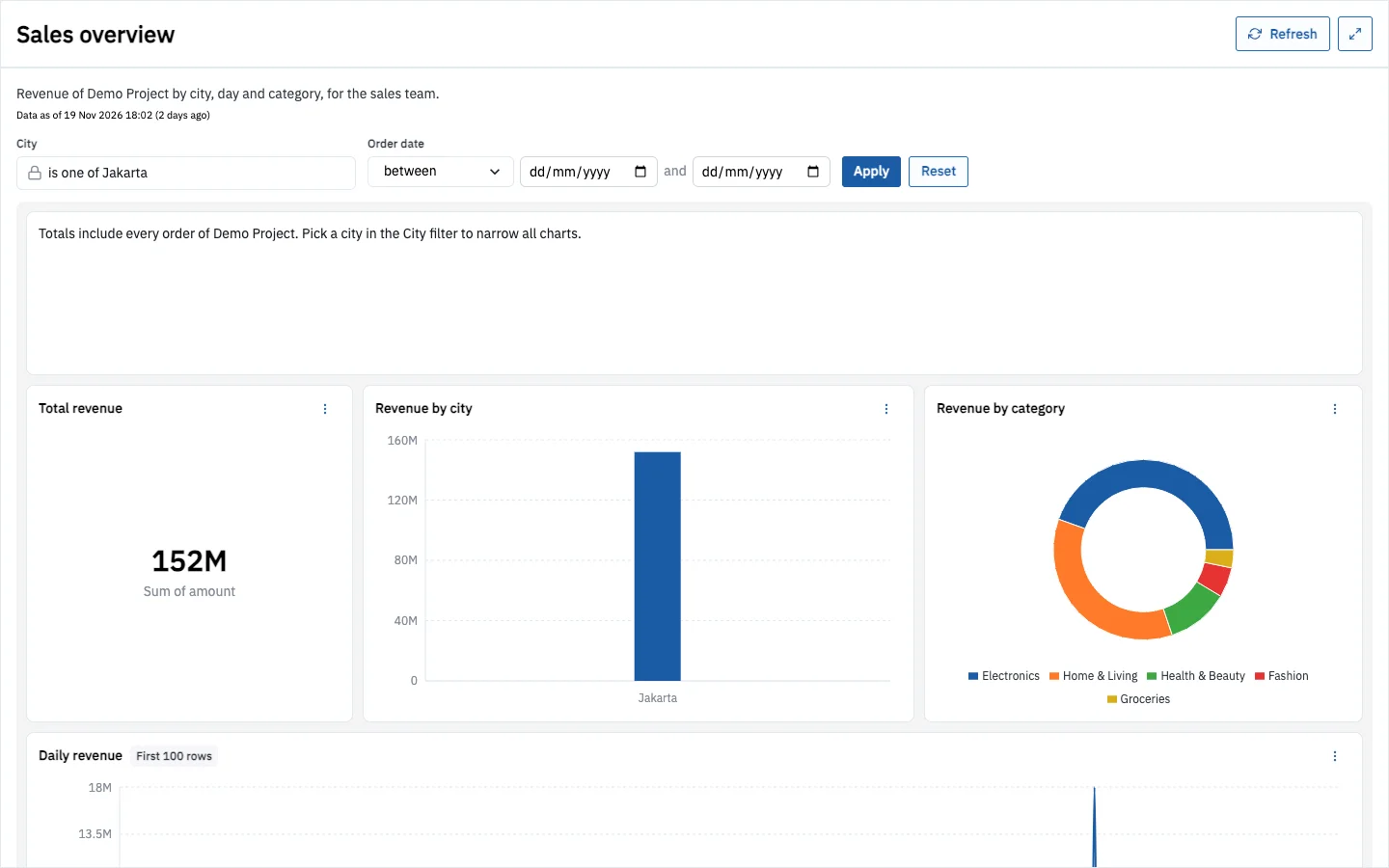
- If you want to limit visitors, apply the dashboard filters first, for example City › is one of ›
Jakarta. - Open Share › Public link and click Create public link.
- Choose Link works for: 1 day, 7 days, 30 days (default), 90 days, 1 year or Never (until revoked).
- Optionally set Password (optional), 8 to 72 characters. Share it separately from the link.
- Optionally tick Lock the current filter values. Check the summary of what visitors can see.
- Click Create link, then Copy under Copy this link now: it is shown only once.
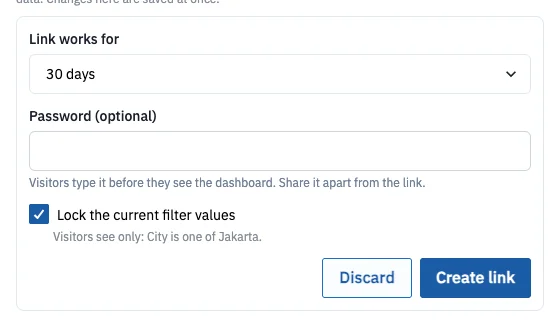
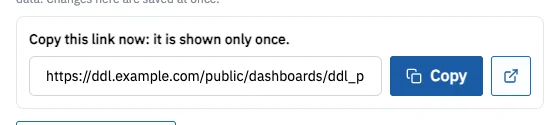
Public-link changes take effect at once, independently of the Save button for people and groups. A dashboard can have up to 20 active links. Links cannot be edited or regenerated: revoke a link and make a new one if its expiry, password or filters should change.
The list shows Active, Expired or Revoked, a Password badge where set, expiry, view count, locked filters and who created it. It counts views, not the identities of visitors.
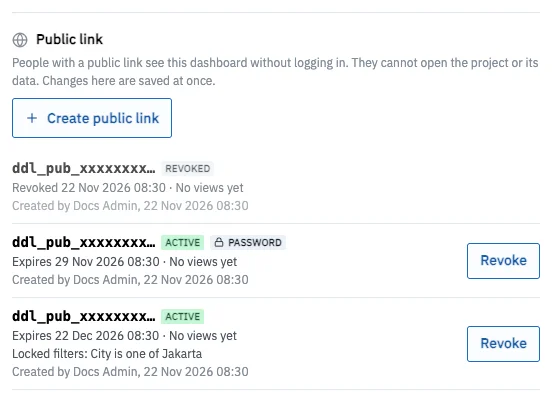
Revoke a link
Section titled “Revoke a link”Click Revoke, read the confirmation, then click Revoke link. It stops working at once; DDL confirms Link revoked. Do this if a link was sent to the wrong audience.
What visitors see
Section titled “What visitors see”Visitors see the dashboard’s name, description, data time, filters, Refresh and full screen, without DDL’s navigation or AI Assistant. They can change unlocked filters and download supported charts as PNG, but cannot export CSV. Source-row tables show at most 100 rows; personal-data masking still applies.
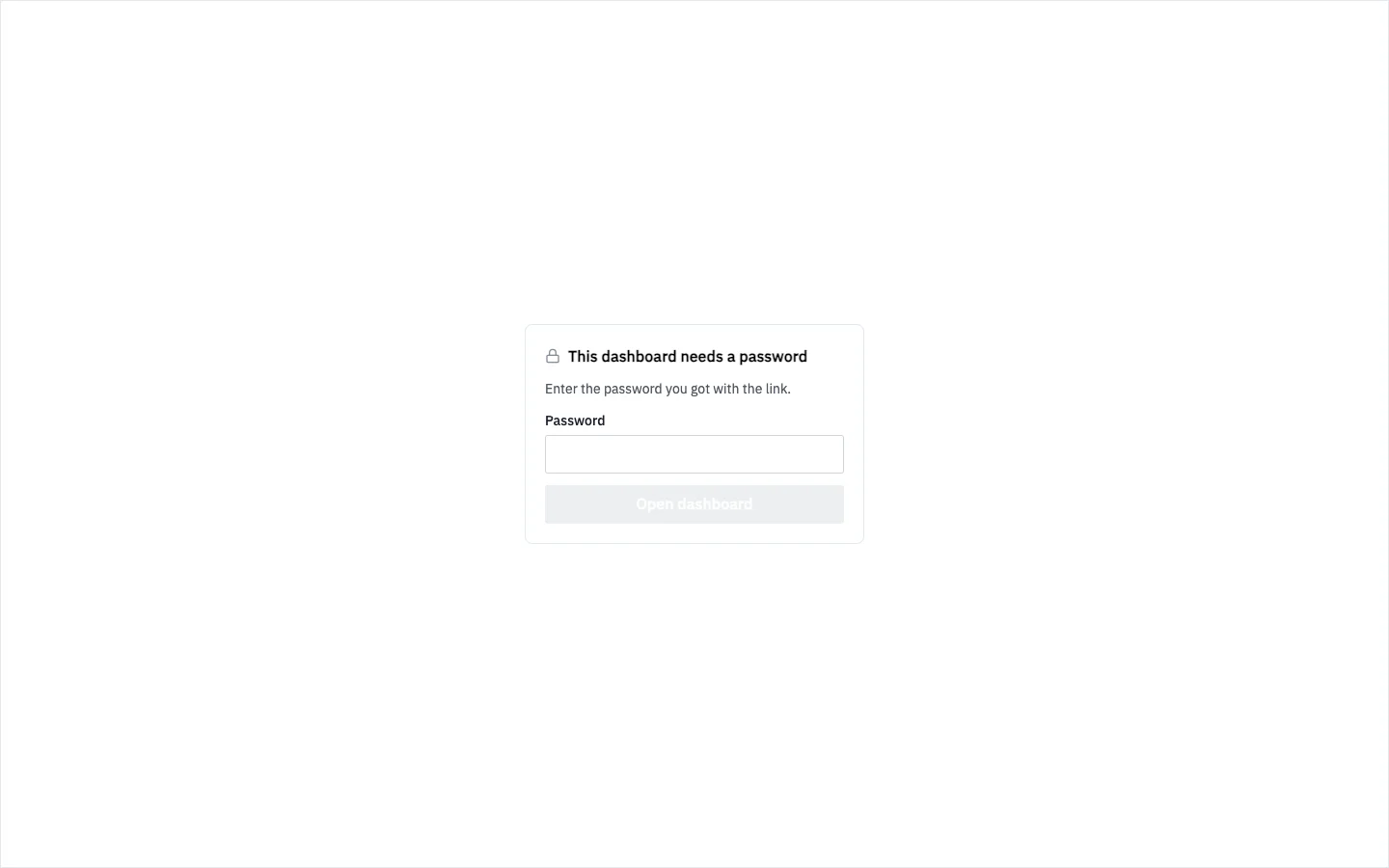
A protected link asks This dashboard needs a password. Enter Password and click Open dashboard. The browser tab stays unlocked for an hour. Five wrong attempts within 15 minutes temporarily block further attempts.
| Message | Meaning |
|---|---|
| This link does not exist | The address is wrong, or public links are turned off. |
| This link is no longer available | It expired, was revoked, its creator lost access, or a locked filter changed. Ask for a new link. |
| This dashboard is not available | It now shows data that cannot be shared outside DDL. |
| Too many requests | Wait before refreshing again. |

Embed a dashboard in another app
Section titled “Embed a dashboard in another app”Embedding needs setup by your DDL administrator and the team running the other application. In Share › Embed, switch on Allow embedding in other apps and use Copy ID beside Dashboard ID.
The other application’s server creates a short-lived access token, valid for at most 24 hours, and opens the embedded dashboard in an iframe. Its developers must get the integration details from your DDL administrator; never put the signing secret in a browser. Tokens can lock filter values and do not use a dashboard password.
Switching embedding off stops every embedded copy immediately. Embedding needs Modify Project or superadmin access and is unavailable for sensitive dashboards. Personal-data masking applies, and the embedded view cannot export CSV.
An expired embed says This embedded dashboard has expired: reload the containing application to get fresh access. An invalid token or disabled embedding says This dashboard is not available.
Dashboard viewer accounts
Section titled “Dashboard viewer accounts”A dashboard viewer is a read-only account for someone who should only see chosen dashboards. A superadmin creates it and chooses its grants in Settings › Users › Dashboard access. It cannot be selected in Share, edit, share, subscribe, or open projects, AI or other DDL features. See Dashboard viewer accounts.
E-mail a dashboard on a schedule
Section titled “E-mail a dashboard on a schedule”Subscribe starts a new distribution, with Attach a dashboard snapshot switched on and this dashboard chosen. The picture uses the dashboard’s default filter values, not your current selections.
You and the Distribution service account need View Project on the source project. A dashboard-only share is not enough. Subscribe is unavailable to viewer accounts and on public or embedded pages.
Who can do what
Section titled “Who can do what”| Action | Project access | Dashboard-only share | Viewer, public or embed access |
|---|---|---|---|
| Open, filter and refresh | View Project or Modify Project | View or Can edit | Only the granted or linked dashboard |
| Real personal values while masking is on | Yes | No | No |
| Export CSV | Yes | Masked; refused for sensitive rows | Viewer: masked, subject to sensitive-data rules. Public/embed: no |
| Edit layout, text and existing filters | Modify Project, or an additional edit share | Can edit, except personal-data filters | No |
| Add charts or new filter columns | Project access plus dashboard edit access | No project chart or column list | No |
| Share and unshare | Modify Project, or an edit share | Can edit, within your division | No |
| Create charts and dashboards | Modify Project | No | No |
| Public links, embedding and deletion | Modify Project | No | No |
Superadmins can open a dashboard by its address, edit, share across divisions, manage public links and embedding, and delete it. Their Dashboards page still lists only their own and shared dashboards, not every dashboard. Creating charts or dashboards needs Modify Project, and the editor needs project access to list charts and columns. Division administrators have no extra dashboard rights.
If someone loses Modify Project, ownership alone does not preserve delete, public-link or embed control. Their public links stop working until access is restored. Removing access takes effect on the next request; another remaining share may still grant access. Deleting an account also deletes its charts and dashboards.
Troubleshooting
Section titled “Troubleshooting”| Problem | Cause and fix |
|---|---|
| Share is missing | You have view-only dashboard access. Ask its owner. |
| Public link or Embed is missing | It is turned off, or you have only an edit share rather than Modify Project. |
| Free users cannot edit dashboards | Give view access without Can edit. |
| You can share with your own division only | Choose someone in your division, or ask a superadmin. |
| A dashboard has at most 20 active public links; revoke one first | Revoke an unused link before creating another. |
| A working link becomes unavailable | Check its expiry, creator’s project access and locked filters. Restore access or issue a new link. |
| A colleague sees ••• | Personal-data masking applies without project access. Grant View Project only if they may see the project’s data. |
| A viewer cannot be picked in Share | Give it an explicit grant through Dashboard access instead. |
| An embedded page says This dashboard is not available | Ask the integrating team to check its token and whether embedding is on. |